
Daily , Weekly and Monthly Check list and To Do Guide for the Cluster-infrastructure - NIIT Tobacco Project: Difference between revisions
Created page with "<center>Daily , Weekly and Monthly Check list and To Do Guide for the Cluster-infrastructure</center> Shashank Kumar Singh <center>Tetra Information Services</center> == ..." |
No edit summary |
||
| Line 1: | Line 1: | ||
[[category:NIIT-Tobacco Board Project]] | |||
== '''Table of Contents''' == | == '''Table of Contents''' == | ||
== Checking for cluster-infrastructure == | |||
Check whether the cluster is running properly or not. For this go to | |||
'''Computer >> Yast >> Pacemaker''' connect with username '''hacluster''' and password '''linux''' and check that all services should be running properly. | |||
[ | [[Image:Daily-1.png]] | ||
# == Database Backup == | |||
Chcek the database backup is run in the last night or not if not please run it manually.<br/> '''Computer >> places >> file system >> root >> backup'''<br/> and check the date wise backup<br/> | |||
[ | [[Image:Daily-2.png]] | ||
[ | |||
For command line go through following steps<br/> | |||
The output should be showing like this if the backup are not present then take backup manually through below command<br/> | The output should be showing like this if the backup are not present then take backup manually through below command<br/> | ||
[[Image:]] | [[Image:Daily-3.png]] | ||
| Line 53: | Line 35: | ||
Check that windows partition is mounted on the server and if it is not mount the go through launcher or follownig steps to check mounting and mount the partition. | Check that windows partition is mounted on the server and if it is not mount the go through launcher or follownig steps to check mounting and mount the partition. | ||
[[Image:]] | [[Image:Daily-4.png]] | ||
It shows like this if it now showing any output it means the barcode printer is unmounted from the server then rum following command to mount barcode printer on the server again | |||
[[Image:]] | |||
[[Image:Daily-5.png]] | |||
Now it has been done if any error occur the please check on the windows machine if there is sharing of printer folder has been done correctly or not also check for the windows user name and password. | Now it has been done if any error occur the please check on the windows machine if there is sharing of printer folder has been done correctly or not also check for the windows user name and password. | ||
| Line 74: | Line 58: | ||
Step 1: Login the hawk webinterface [https://clusterip:7630/ https://clusterip:7630] with username '''hacluster''' | Step 1: Login the hawk webinterface [https://clusterip:7630/ https://clusterip:7630] with username '''hacluster''' | ||
and password '''linux'''[[Image:]] | and password '''linux''' | ||
[[Image:Daily-6.png]] | |||
Step 2: Click the table view on the right corner for easy view this would be shown like this | Step 2: Click the table view on the right corner for easy view this would be shown like this | ||
[[Image:]] | [[Image:Daily-7.png]] | ||
Now you can mange resource, services and constraints or stop, start cluster services from here | Now you can mange resource, services and constraints or stop, start cluster services from here | ||
[[Image:]] | [[Image:Daily-8.png]] | ||
== Moniter nad managing the Cluster-infrastructure via Command line == | == Moniter nad managing the Cluster-infrastructure via Command line == | ||
Revision as of 11:45, 12 January 2013
Table of Contents
Checking for cluster-infrastructure
Check whether the cluster is running properly or not. For this go to
Computer >> Yast >> Pacemaker connect with username hacluster and password linux and check that all services should be running properly.

- == Database Backup ==
Chcek the database backup is run in the last night or not if not please run it manually.
Computer >> places >> file system >> root >> backup
and check the date wise backup
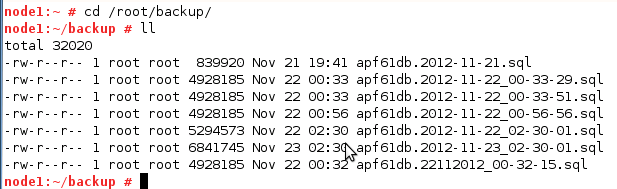

For command line go through following steps
The output should be showing like this if the backup are not present then take backup manually through below command

Run Call Procedure
Chcek for the data call procedure process and if it is not run in night the run through given launcher or from the command line through following steps
cd /opt/scripts
./ call_tb_proc_daily_configuration.sh
Ping Check for each Server
Check that both server ping from each other and accessable from each other. For this ping from both Server to each other and make sure they are pinging to each other and accessible from each other== Mount Windows Partition == Check that windows partition is mounted on the server and if it is not mount the go through launcher or follownig steps to check mounting and mount the partition.

It shows like this if it now showing any output it means the barcode printer is unmounted from the server then rum following command to mount barcode printer on the server again

Now it has been done if any error occur the please check on the windows machine if there is sharing of printer folder has been done correctly or not also check for the windows user name and password.
Check Ping From remote machine
Check ther servers and cluster are ping from local and remote machines .For this ping gate way and cluster machine from other machine.
Check Date and time
Check the date and time on each server and make sure both should be same.
Moniter the Cluster-infrastructure
For monitoring the cluster from the Local network we can use hawk web interface for this follow belo given step
Step 1: Login the hawk webinterface https://clusterip:7630 with username hacluster
and password linux

Step 2: Click the table view on the right corner for easy view this would be shown like this

Now you can mange resource, services and constraints or stop, start cluster services from here

Moniter nad managing the Cluster-infrastructure via Command line
Management of Cluster through CLI:-
1:- For monitoring cluster-infrastructure
crm_mon
2:- To see the resource list
crm resource list
3:- To start a resource-only
- Log in as root and start the crm tool:
# crm configure - Switch to the resource level:
crm(live)# resource - Start the resource with start and press the →| key to show all known resources:
crm(live)resource# start start ID
4:-To cleanup resource
- Get a list of all your resources:
# crm resource list - Remove the resource:
# crm resource cleanup resource [node]
if you leave node option it will be clean for all nodes.
5:- To stop a resource-only
- Get a list of all your resources:
# crm resource list - Stop the resource:
# crm resource stop resourcename [node]
Where clvm is the resource name
Weekly task
- Supportconfig Report ( Refer to Automatic Report creation document )
- HB_Report execution ( Refer to Automatic Report creation document )
Monthly task
- Image creation for the Systems
- Shareing of Supportconfig Report ( Refer to Automatic Report creation document ) to all stakeholders
- Shareing of HB_Report execution ( Refer to Automatic Report creation document ) to all Stakeholders